
 By Adrian Pascual•Hiring insight•Published
How Automated Screening Works for Managers: 2026 Guide
Automated screening is defined as a structured, technology-driven workflow that applies predefined criteria and scoring algorithms to filter, rank, and shortlist candidates before a human recruiter reviews them. Understanding how automated screening works for managers is the first step toward using it well. The process combines rules-based logic with AI-powered resume parsing, rubric scoring, and optional chatbot pre-screening to reduce manual triage. Managers who configure these systems correctly can cut recruiter screening hours by 60–75% and reduce time-to-hire by up to 92%. That kind of efficiency gain does not happen by accident. It requires clear criteria, transparent scoring, and deliberate human oversight at every stage.
How does automated screening work for managers?
Automated screening functions as a decision-support system, not a replacement for human judgment. The system applies your predefined criteria to incoming applications and returns a ranked shortlist with evidence-based rationale. Managers define what "qualified" means before the automation runs. The technology executes that definition at scale.
A standard screening workflow consists of five stages: role requirements definition, resume parsing, rubric scoring, optional chatbot pre-screening, and shortlist delivery. Each stage builds on the previous one, which means a weak definition at stage one creates noise at every stage that follows. Getting stage one right is the most important thing you can do before touching any software.

The workflow also connects to your applicant tracking system (ATS). When a candidate applies, the ATS triggers the screening workflow automatically. That trigger eliminates the manual step of opening each application individually, which is where most recruiter time disappears on high-volume roles.
What are the core stages of an automated screening process?
Each stage in the automated screening process has a distinct function. Understanding what happens at each step helps managers set realistic expectations and identify where human review adds the most value.
Stage 1: Role requirements definition. You and your recruiter document must-have criteria (non-negotiable qualifications) separately from nice-to-have criteria (preferred but not required). This distinction drives the scoring weights in the rubric. Skipping this step is the single most common cause of poor shortlist quality.
Stage 2: Resume parsing. The system reads each resume and converts unstructured text into structured data fields: job titles, years of experience, skills, education, certifications, and location. Parsing accuracy depends on resume format. Standard chronological resumes parse cleanly. Heavily designed PDFs with graphics or tables often produce parsing errors that drop qualified candidates.
Stage 3: Rubric-based scoring. Each parsed data point is matched against your criteria and weighted. A candidate with a required certification scores higher than one without it. The system calculates a total score and ranks the applicant pool. Scores are tied to specific resume evidence, not to opaque algorithmic outputs.
Stage 4: Optional chatbot pre-screening. For roles with high application volume, a chatbot can ask two to four qualifying questions after the initial score. Questions like "Are you legally authorized to work in the United States?" or "Do you have an active PMP certification?" filter out candidates who pass the resume screen but fail a basic qualifier. This step saves recruiters from discovering disqualifying information during a phone screen.
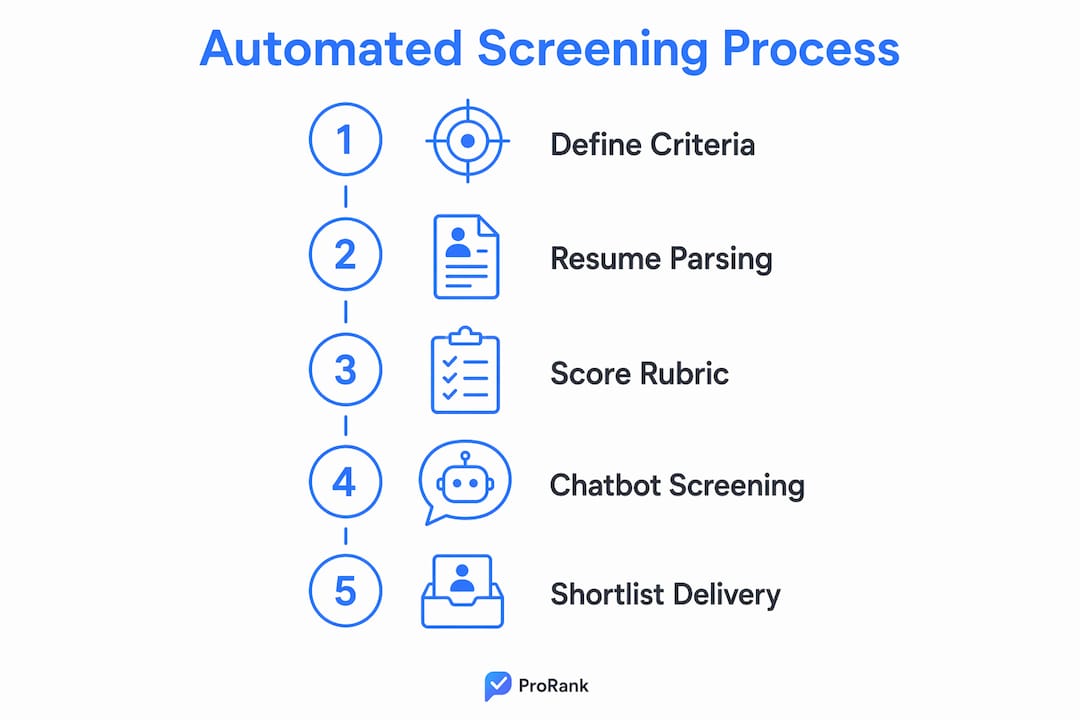
Stage 5: Shortlist delivery and outreach. The system generates a ranked shortlist and routes it to the recruiter review queue. Automated outreach sends interview invitations or rejection notices based on score thresholds you set in advance. Faster candidate responses consistently score higher in candidate experience surveys. Candidates who wait two weeks for a rejection notice form a negative impression of your employer brand.
Pro Tip: Use AI call coaching for recruiters to help your team ask better qualifying questions during the chatbot design phase. The questions you automate should mirror the ones your best recruiters ask in the first five minutes of a phone screen.
How does automated screening improve recruitment efficiency?
The efficiency gains from automated screening are measurable and well-documented. Recruiters handling high-volume roles typically spend 8–18 hours per requisition on manual triage alone. Automation eliminates most of that work.
"Automate screening when recruiters handle more than 25 candidates per requisition or when time to first contact exceeds 5 business days. At that threshold, manual screening is no longer a viable process."
That benchmark matters because time-to-first-contact directly affects offer acceptance rates. Top candidates receive multiple offers. A recruiter who reaches a strong applicant on day two beats the recruiter who reaches the same person on day nine. Automation compresses that gap.
The human-in-the-loop model preserves quality control without sacrificing speed. In this setup, the AI proposes rankings and the recruiter reviews the top tier before any candidate moves forward. Recruiter review of AI scores and their linked evidence builds trust in the system over time. Recruiters stop second-guessing the shortlist when they can see exactly why each candidate ranked where they did.
Candidate experience also improves. Automated rejection notices sent within 24–48 hours of application are rated more favorably than silence or delayed responses. Candidates who receive a clear, respectful rejection quickly are more likely to reapply for future roles. That matters for employer brand in competitive hiring markets.
What managerial decisions are required for effective automated screening?
Automation handles execution. Managers handle judgment. The distinction is not semantic. It defines where accountability sits and what you must actively oversee.
Here are the four decisions that belong to you, not the system:
- Approve the scoring rubric before the system goes live. Every weight assigned to a criterion reflects a judgment call about what predicts job success. That judgment belongs to the hiring manager, not the software vendor. Review the rubric with your recruiter and sign off on it formally before the first application is processed.
- Review AI-generated scores with their evidence. Do not approve a shortlist based on rank order alone. Open the top 10 candidates and read the rationale tied to each score. If the evidence does not match your expectations, the rubric needs adjustment. Transparent scoring rationale linked to resume evidence is what separates a trustworthy system from a black box.
- Exercise and document overrides. When you move a lower-ranked candidate forward or remove a higher-ranked one, record your reason. Audit trails of override decisions are required for legal compliance and are essential for calibrating the rubric over time. Without them, you cannot prove fairness if a hiring decision is challenged.
- Calibrate the system after each hiring cycle. Compare the scores of candidates who received offers against those who were rejected. If strong hires consistently scored in the middle tier, a criterion is weighted incorrectly. Calibration is not a one-time setup task. It is an ongoing management responsibility.
Pro Tip: Schedule a 30-minute rubric review with your recruiter after every five hires made through the automated process. Small adjustments made early prevent significant scoring drift over a full quarter.
What are the common pitfalls when implementing automated screening?
Most automated screening failures trace back to process problems, not technology problems. The system executes what you define. If the definition is vague, the output is unreliable.
- Automating before defining criteria. Launching a screening workflow without a documented rubric produces a ranked list that reflects nothing meaningful. Automating a poorly defined process amplifies the confusion rather than resolving it. Write the scorecard first. Build the automation second.
- Skipping a pilot phase. Rolling out automated screening across all open roles simultaneously creates too many variables to diagnose when something goes wrong. Piloting on a single role with a hiring manager who actively supports the process creates an internal champion and surfaces issues before they scale.
- Removing the human review step. Fully automated rejection without recruiter review creates compliance risk. Anti-discrimination regulations in the United States require that hiring decisions be explainable and defensible. A recruiter who reviews the shortlist before rejections go out provides that layer of accountability.
- Sending careless rejection notices. Automated outreach that reads like a form letter damages your employer brand. Write rejection templates that are specific to the role and respectful in tone. Candidates share their experiences publicly, and a poorly worded automated rejection circulates faster than a positive one.
- Ignoring scoring drift. Rubric weights that were accurate in january may be misaligned by june if the labor market shifts or the role evolves. Review your scoring criteria at least quarterly. Compare the profile of recent hires against the rubric to confirm alignment.
For a broader view of where automated screening fits within your overall hiring approach, the candidate screening methods guide from Evy covers the full range of options available to HR teams in 2026.
Key Takeaways
Automated screening works best when managers define clear criteria, maintain human oversight, and treat calibration as a continuous process rather than a one-time setup task.
| Point | Details |
|---|---|
| Define criteria before automating | Document must-have and nice-to-have criteria in a rubric before any workflow goes live. |
| Expect measurable time savings | Automation reduces recruiter triage time by 60–75% and can cut time-to-hire by up to 92%. |
| Keep humans in the loop | Recruiters must review AI-generated scores and rationale before candidates advance or receive rejections. |
| Maintain audit trails | Log every override with a reason to support legal compliance and ongoing rubric calibration. |
| Pilot before scaling | Start with one high-volume role to build internal trust and identify configuration issues early. |
What I've learned from watching managers adopt automated screening
The managers who get the most out of automated screening share one trait: they treat the rubric as a living document. They do not set it up in week one and forget it. They review it after every hiring cycle, compare it against the candidates who actually succeeded in the role, and adjust weights accordingly.
The managers who struggle share a different trait: they hand the rubric design entirely to a vendor or an HR coordinator and then lose confidence in the shortlists when the output does not match their instincts. That loss of confidence is almost always a rubric problem, not a technology problem.
Transparency is the other factor that separates successful adoption from frustration. When a manager can open a candidate's profile and see exactly which resume evidence drove the score, they trust the system. When the score appears without explanation, they override it constantly and the efficiency gains disappear. The technology is only as trustworthy as the rationale it shows you.
The compliance dimension also deserves more attention than most managers give it. Audit trails are not bureaucratic overhead. They are your legal defense if a rejected candidate files a discrimination complaint. Every override you document is evidence that a human reviewed the decision. Every rubric weight you approved in writing is evidence that the criteria were job-related. Build those habits from day one, not after a problem surfaces.
— Hudson
Evy's approach to automated candidate screening
Hiring managers who want the efficiency of automated screening without sacrificing interview integrity have a specific problem to solve. Automated shortlists surface qualified candidates, but the interview stage is where AI-assisted cheating has become a real risk.
Evy integrates with your existing ATS to trigger screening workflows automatically, supports rubric-based scoring with transparent candidate evidence, and automates outreach and scheduling. What sets Evy apart is real-time eye tracking during AI-powered interviews, which catches candidates using AI assistance during the interview itself. You can review Evy's full screening and interview features to see how the platform connects automated screening with verified interview integrity. For teams scaling hiring in 2026, that combination of speed and trust is worth examining closely.
FAQ
What is automated candidate screening?
Automated candidate screening is a workflow that uses predefined criteria and AI-powered scoring to filter and rank job applicants before human review. It replaces manual resume triage with structured, evidence-based shortlists.
When should managers implement automated screening?
Automate screening when recruiters handle more than 25 candidates per requisition or when time to first recruiter contact exceeds 5 business days. Below those thresholds, manual review is often sufficient.
How does automated screening support managerial decisions?
The system proposes ranked shortlists with scoring rationale tied to resume evidence. Managers review those scores, exercise overrides when needed, and document their reasoning to maintain compliance and calibrate the rubric over time.
What is a human-in-the-loop screening model?
A human-in-the-loop model means the AI ranks candidates and a recruiter reviews the top tier before any candidate advances or receives a rejection. This setup preserves compliance accountability and builds trust in the system's outputs.
How do you prevent bias in automated screening?
Publish the scoring rubric before screening begins, link every score to specific resume evidence, log all override decisions with reasons, and audit the rubric quarterly against the profiles of successful hires to prevent criteria drift.