
 By Adrian Pascual•Hiring insight•Published
How to Use Eye Contact Cues in Interviews: HR Guide
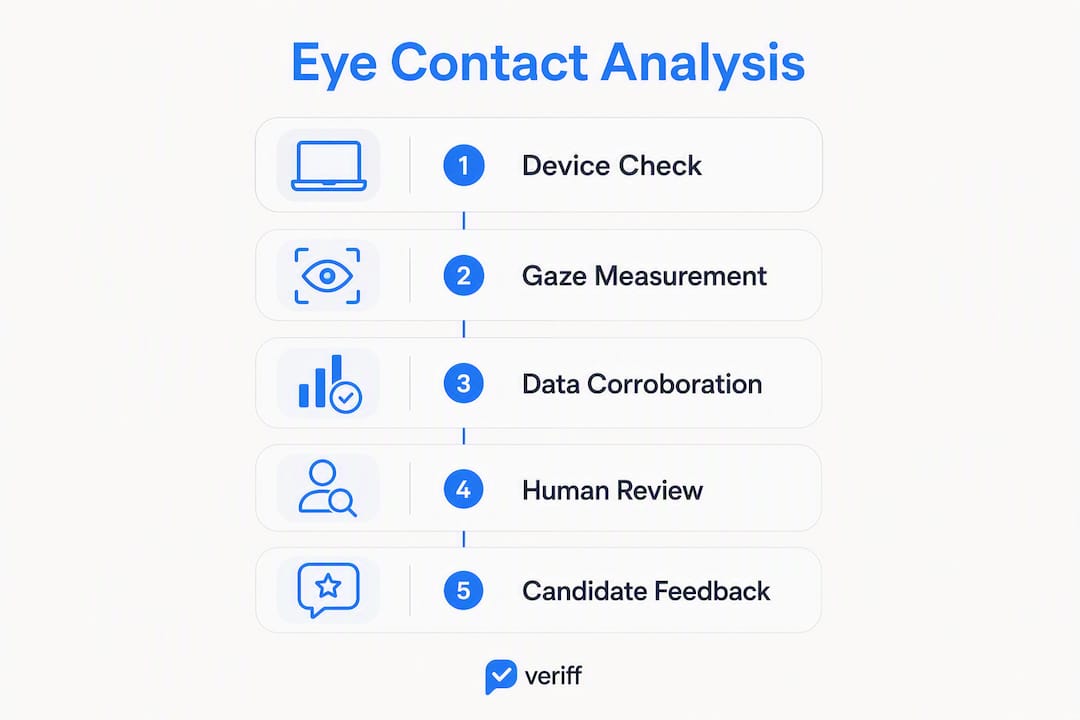
Gaze data from real-time eye tracking can flag probable cheating or low engagement in video interviews, but it is not standalone proof of either. Before any adverse action, you need device checks, corroborating signals, and a human reviewer in the loop. That sequence matters more than the signal itself.
Three immediate steps for any hiring team:
- Triage the device first. Confirm the candidate's webcam resolution, lighting, and camera angle are adequate before treating gaze anomalies as behavioral evidence.
- Fuse signals before escalating. Require at least two independent indicators, such as sustained off-screen gaze combined with audio hesitancy or abnormal response latency, before flagging a case for review.
- Route every flag to a human reviewer. Log the evidence bundle, document the reviewer's decision, and follow your consent policy before communicating any outcome to the candidate.
What gaze tracking can measure: fixation points (where the eyes land), fixation duration (how long they stay), off-screen duration (time spent looking away), gaze vector and saccades (the direction and speed of eye movement between fixations), and blink rate. What it cannot do is prove intent. A candidate looking away from the camera may be reading a cheat sheet, checking a second monitor, or simply thinking.
Pro Tip: Treat every automated gaze flag as an evidence bundle, not a decision. Log the raw metrics, attach the corroborating signals, and require a named human reviewer to sign off before any candidate communication.
Table of Contents
- How does real-time eye tracking measure gaze in video interviews?
- How do you rule out device and setup errors before acting on gaze data?
- How do you combine gaze with audio and timing signals reliably?
- What behavioral patterns suggest AI- or human-assisted cheating?
- What policies and workflows do you need to operationalize gaze-based flags?
- How do you pilot and validate eye-tracking signals before full deployment?
- What do real screening scenarios look like in practice?
- Key Takeaways
- Why gaze data is misused more often than it's misread
- Evy brings real-time eye tracking and anti-cheat fusion to your screening workflow
- Useful sources and further reading
How does real-time eye tracking measure gaze in video interviews?
The pipeline runs in four stages: the camera captures a video frame, a face-detection model locates the candidate's face, an eye-landmarking algorithm identifies the iris and pupil positions, and a gaze-vector model maps those positions to estimated screen coordinates. The result is a continuous stream of gaze data updated frame by frame.
The core metrics your system should surface:
- Fixation: a stable gaze point held for roughly 100–300 milliseconds, indicating focused attention on a specific area.
- Fixation duration: how long a single fixation lasts; unusually long durations on off-screen areas are a primary cheating indicator.
- Saccades: rapid eye movements between fixations; irregular saccade patterns can suggest reading from an external source.
- Gaze vector: the estimated direction of the line of sight; used to determine whether the candidate is looking at the screen, the camera, or elsewhere.
- Off-screen duration: cumulative time the gaze falls outside the screen boundary; the most operationally useful metric for triage.
- Blink rate: deviations from a normal baseline can indicate stress or fatigue, though this metric requires careful calibration.
Research shows that camera-directed gaze receives higher evaluations than downward-skewed gaze, which means the system's perceptual baseline already favors candidates who look at the camera. That built-in bias is worth acknowledging when you set thresholds. Technical limitations are real: poor lighting, low resolution, and camera obstruction all degrade accuracy substantially, and network latency can introduce frame-drop artifacts that mimic gaze anomalies.

How do you rule out device and setup errors before acting on gaze data?
A gaze anomaly is only meaningful after you have eliminated the hardware and environment as causes. Work through this checklist before treating any flag as behavioral evidence.
Pre-interview calibration checklist:
- Webcam resolution unobstructed and positioned at eye level.
- Ambient lighting from the front, not behind the candidate; backlighting washes out facial landmarks.
- Camera-to-screen angle within roughly 15 degrees of horizontal; vertical deviations have small effects on ratings, but horizontal deviations can meaningfully reduce perceived social presence.
- Single-monitor setup confirmed; dual-monitor candidates will show legitimate off-screen gaze that the system may misread.
- No privacy screen filter on the webcam or monitor.
- Head stability: the candidate should be seated, not using a handheld device.
Before the interview begins, ask candidates three diagnostic questions: Are you on a mobile device? Are you using an external monitor? Do you have a privacy filter on your screen? Their answers let you adjust thresholds or flag the session for manual review from the start.
Pro Tip: Automated pre-interview system checks, run by the platform before the first question loads, catch the most common hardware issues without requiring candidates to self-report. Mandatory calibration runs reduce false positives substantially and protect you from acting on bad data.
How do you combine gaze with audio and timing signals reliably?
Gaze tracking is most powerful as one of several signals, combined with audio features, micro-expressions, and behavioral telemetry. A single off-screen fixation means almost nothing. Two or more independent signals pointing in the same direction is a different matter.
Fusion rule: require at least two corroborating indicators before escalating a case. Examples of higher-confidence flag combinations:
- Sustained off-screen gaze + repeated transcript mismatches (spoken words don't match the question asked).
- Abnormal response latency (unusually fast or patterned answer timing) + gaze clusters in screen whitespace.
- Audio hesitancy patterns (long pauses before fluent delivery) + off-screen fixation at the moment of the pause.
| Metric | What it measures | Why it matters | Triage threshold (illustrative) |
|---|---|---|---|
| Off-screen duration | Time gaze falls outside screen boundary | Primary indicator of external resource use | Flag for review if sustained; validate with pilot data |
| Response latency | Time between question end and answer start | Abnormal patterns may suggest AI-generated responses | Compare against cohort baseline |
| Transcript mismatch | Divergence between spoken and expected content | Suggests reading or AI dictation | Any consistent mismatch warrants review |
| Audio hesitancy | Pause-to-fluency ratio within a single answer | Indicates possible real-time AI assistance | Flag when paired with gaze anomaly |
| Fixation duration | Length of individual gaze holds | Long off-screen holds suggest reading | Calibrate threshold per device environment |
Note: numeric thresholds in the table above are illustrative starting points. Set your own values during the pilot phase described in Section 7.
What behavioral patterns suggest AI- or human-assisted cheating?
Cheating patterns in video interviews tend to be rhythmic and positional in ways that normal thinking pauses are not. Pupil-tracking research confirms that gaze distributions shift during incentivized cheating, though results are noisy without robust machine learning and larger datasets.
Higher-confidence cheating indicators:
- Repeated long off-screen fixations at a predictable rhythm, consistent with reading from a phone or printed notes.
- Gaze heatmap clusters in screen whitespace or below the video window, where a secondary device might sit.
- Synchronized audio/text mismatches: the candidate reads fluently but the content doesn't track the question.
- Eye movement that traces a consistent horizontal path at a fixed vertical position, suggesting an external screen.
Common false positives to account for:
- Thinking pauses: brief upward or lateral gaze shifts are normal cognitive behavior.
- Multi-monitor setups: legitimate off-screen gaze if the candidate disclosed a second display.
- Neurodivergent gaze patterns: some candidates maintain less camera-directed gaze without any intent to cheat; defining engagement by consistent behavioral patterns rather than "perfect" eye contact protects against this bias.
- Camera placed above the screen: produces a downward gaze that looks like disengagement but is simply the candidate watching the interviewer's face.
What policies and workflows do you need to operationalize gaze-based flags?
Policy consistency protects both candidates and your organization. Every flagged case should follow the same documented path, regardless of the reviewer.
Policy template items:
- Consent language: "This interview uses automated gaze analysis to support screening integrity. Data is reviewed by a human before any decision is made. [See our privacy notice for retention and deletion rights.]"
- Permitted use: gaze data informs triage only; it does not generate automated pass/fail decisions.
- Data retention: define a maximum retention period (consult legal counsel for your jurisdiction).
- Human-review requirement: every flag must be reviewed by a named individual before candidate communication.
- Audit logging: log the flag, the evidence bundle, the reviewer's identity, and the outcome for every case.
Flagging workflow:
Automated flag → evidence bundle assembled (gaze metrics + corroborating signals) → human reviewer checklist completed → outcome: clear (no action), clarify (follow-up question to candidate), or escalate (senior review or candidate disqualification with documented rationale).
When a case reaches the "clarify" stage, use non-accusatory language. A useful prompt: "We noticed some unusual patterns during your session. Can you walk us through your setup and whether anything unexpected happened during the interview?" That question surfaces legitimate technical issues without implying guilt.
Pro Tip: Build the candidate communication template into your ATS workflow so every flagged candidate receives a consistent, respectful message regardless of which recruiter handles the case.
How do you pilot and validate eye-tracking signals before full deployment?
Validation before full deployment is not optional. Gaze signals can carry demographic bias, and a system that flags one group disproportionately creates legal and reputational exposure.
Pilot checklist:
- Define a minimum sample size that includes both confirmed-clean and controlled-cheating cases.
- Mix device types (laptop, desktop, external webcam) and lighting environments.
- Include a representative demographic mix and run parity checks by age, gender, and race.
- Run consented A/B sessions against human proctoring to establish a ground-truth baseline.
- Document every flag, reviewer decision, and overturn in a shared audit log.
Metrics to track:
| Metric | Definition | Target |
|---|---|---|
| False-positive rate | Flags on clean candidates / total clean candidates | Minimize; set ceiling during pilot |
| Precision | True cheating flags / total flags | Maximize; track against human-review overturn rate |
| Recall | True cheating flags / total actual cheating cases | Balance against false-positive rate |
| Demographic parity | Flag rate across demographic groups | No statistically significant disparity |
| Triage-to-action lag | Time from flag to reviewer decision | Define SLA; track for bottlenecks |
| Reviewer overturn rate | Flags reversed by human review / total flags | High overturn = threshold recalibration needed |
Run a formal audit every quarter. Set automated alerts for metric drift, particularly if the false-positive rate or demographic parity score moves outside the bounds established during the pilot. Practitioner guidance consistently recommends flagging for human review rather than automated decisions, and the overturn rate is your clearest signal that thresholds need adjustment.
What do real screening scenarios look like in practice?
Scenario A: A candidate completes a 20-minute asynchronous screen. The system flags sustained off-screen fixations at a consistent downward angle, occurring every 45–60 seconds. Audio analysis shows fluent delivery with no hesitation, but transcript review reveals answers that don't track the specific question wording. The human reviewer notes the rhythmic pattern and the content mismatch, classifies the case as "escalate," and sends the candidate a setup clarification request. The candidate's response doesn't account for the pattern. The case is documented and the candidate is not advanced.
Scenario B: A candidate is flagged for frequent off-screen gaze. The reviewer checks the pre-interview diagnostic log and finds the candidate disclosed a dual-monitor setup. The gaze pattern matches legitimate screen-switching behavior. The case is cleared, and the team updates their calibration protocol to auto-adjust thresholds for disclosed dual-monitor candidates.
Both cases changed something in the team's workflow. After Scenario A, the team added transcript-mismatch scoring as a required corroborating signal. After Scenario B, they built a dual-monitor disclosure step into the pre-interview checklist.
Key Takeaways
Real-time gaze signals are reliable triage inputs only when paired with device validation, multimodal corroboration, and a documented human-review workflow.
| Point | Details |
|---|---|
| Gaze is triage, not verdict | Every automated flag needs corroborating signals and a human reviewer before any adverse action. |
| Device checks come first | Confirm webcam resolution, lighting, and monitor setup before treating gaze anomalies as behavioral evidence. |
| Fusion rules reduce false positives | Require at least two independent signals (gaze + audio or gaze + latency) before escalating a case. |
| Validate before full deployment | Run a pilot with demographic parity checks, track false-positive rate and reviewer overturn rate, and audit quarterly. |
| Evy provides the full stack | Evy's real-time eye tracking, multimodal fusion, and audit logging map directly to the operational workflow described here. |
Why gaze data is misused more often than it's misread
The most common implementation failure isn't a miscalibrated camera or a noisy signal. It's a team that treats the flag as the finding. Gaze anomalies are evidence of something worth investigating, not evidence of cheating. That distinction sounds obvious, but the operational pressure to move fast in high-volume screening consistently collapses it.
What actually works is building the human-review step into the workflow before the system goes live, not as a safeguard added after the first wrongful disqualification. Teams that get this right tend to have two things in common: they ran a real pilot with controlled cases, and they trained reviewers on what false positives look like before they saw a live flag.
The interview security failures that surface most often in post-mortems aren't technical. They're procedural. A threshold set too low, a reviewer who didn't know what a dual-monitor pattern looks like, a consent form that didn't cover gaze data. The guide above addresses each of those gaps. The question is whether your team implements the checks before or after a problem surfaces.
Training priorities worth scheduling before deployment: calibration drills using your actual candidate device mix, anti-bias training focused specifically on neurodivergent gaze patterns and camera-placement effects, and at least two evidence-bundle review exercises using anonymized historical cases.
Evy brings real-time eye tracking and anti-cheat fusion to your screening workflow
Screening at scale without a reliable anti-cheat layer means your highest-volume interviews carry the most risk. Evy is built specifically for that problem: real-time gaze analytics running during every session, pre-interview calibration checks that catch hardware issues before the first question loads, and multimodal fusion combining gaze, audio, and transcript signals into a single evidence bundle.
Every flagged case in Evy routes to a human-review workflow with full audit logging, so your team has a documented decision trail for every candidate. ATS integration means the workflow fits your existing process rather than replacing it. The anti-cheat features page covers the full capability set, including pilot support and measurement templates for teams running their first deployment. If you're ready to run a structured pilot, that's the right starting point.
Useful sources and further reading
Primary research and operational references used in this guide:
- Off-camera gaze decreases evaluation scores in a simulated online job interview (PMC) — Lab evidence on how gaze direction affects interviewer ratings; relevant to calibration and bias checks.
- Detecting Cheating in Proctored Tests Through Pupil Tracking (UC Berkeley) — Foundational study on gaze distributions during incentivized cheating; supports caution on false positives.
- IVAS: Multimodal AI system for video interview assessment (IDEAS/RepEc) — Technical paper on late-fusion logic combining gaze, facial emotion, and audio features.
- Here's Looking at You: Eye Contact in Video Interviews (Springer) — Experimental findings on camera angle effects and social presence in video interviews.
- AI-assisted Gaze Detection for Proctoring Online Exams (arXiv) — Applied research on detecting off-screen gaze in asynchronous proctored exams.
- Evy features page: real-time eye tracking and anti-cheat workflows — Product capabilities, pilot templates, and audit logging documentation.
This article provides general operational guidance and does not constitute legal advice. Consult qualified legal counsel to confirm that your gaze-tracking and data-retention practices comply with applicable US federal and state law, including the ADA, EEOC guidelines, and relevant state biometric privacy statutes.