
 By Adrian Pascual•Hiring insight•Published
How Real-Time Alerts Work in Hiring: HR Leader's Guide
Employer-facing real-time alerts are automated notifications that fire the moment a candidate event occurs during a screening or interview session, giving your hiring team the information to act in seconds rather than hours. Real-time recruitment analytics enables faster shortlisting and reduced hiring delays by surfacing the right signal at the right moment. Three elements make these notifications work:
- Triggers: the events that generate an alert (completed screens, score thresholds, AI-cheating flags, identity mismatches)
- Delivery channels: where the alert lands (Slack, ATS inbox, email, mobile push, recruiter dashboard)
- Evidence and audit trail: the timestamped log, video, transcript, and scoring metadata attached to every alert for review and compliance
Evy's real-time eye-tracking detection is a practical example of how these elements combine: the moment attention patterns deviate from expected baselines during a live screen, a flag fires and routes to the assigned reviewer with a full evidence bundle attached.
Key Takeaways
Real-time alerts in employer-facing screening platforms reduce recruiter reaction time from hours to minutes by routing AI-detected events, scored screens, and integrity flags directly to the right reviewer with a full evidence bundle attached.
| Point | Details |
|---|---|
| Triggers drive everything | Configure alerts for completed screens, eye-tracking flags, score thresholds, and identity mismatches before launch. |
| Payload design matters | Every alert should carry a severity tag, evidence bundle link, timestamp, and assigned owner to enable immediate action. |
| Suppress noise early | Run shadow alerts for 30 days to tune thresholds and keep false-positive rates below 10% before going live. |
| Reaction-time delta is your ROI metric | Measure time from alert fire to first reviewer action before and after deployment to quantify impact. |
| Evy centralizes the full workflow | Eye-tracking flags, automated scoring, ATS integration, and audit logs are built into a single platform. |
Table of Contents
- How do real-time alerts actually get triggered in hiring?
- Where do alerts land, and how do they connect to your ATS?
- How do you configure thresholds and avoid alert fatigue?
- What evidence and logs should every alert capture?
- How should your team triage and act on alerts day to day?
- What do effective alert messages actually look like?
- Step-by-step rollout checklist for enabling real-time alerts
- How Evy implements these patterns in practice
- When should you trust the alert, and when should a human decide?
- Evy brings these alert patterns together in one platform
- Sources
How do real-time alerts actually get triggered in hiring?
Most hiring platforms generate alerts through a combination of event streaming and AI-model outputs. Understanding which events to watch for, and how the system detects them, is the foundation of any well-configured recruitment alert system.
Typical triggers include:
- Completed screens that cross a pass/fail score threshold
- Eye-tracking anomalies suggesting AI-assisted cheating (sustained off-screen gaze, rapid attention shifts)
- Suspicious behavior patterns: unusually fast answer cadence, copy-paste activity, or browser-tab switching
- Identity verification failures or photo mismatches
- Session inactivity or timeout events
- NLP-scored transcript flags (answer length outliers, templated phrasing)
Detection methods vary by signal type. Eye-tracking and behavioral anomalies rely on AI models running against live video and device telemetry. Score thresholds use rule-based logic applied to NLP scoring outputs. Identity mismatches pull from document-verification APIs. Each of these fires a webhook event that the alert system consumes.
Severity levels keep the signal meaningful. A critical alert (identity mismatch, confirmed AI-cheating flag) demands immediate action. A high alert (score just below threshold, single eye-tracking deviation) warrants same-day review. An informational alert (screen completed, candidate advanced) simply updates the pipeline record.
Pro Tip: Instrument your highest-value roles first. Run strict triggers on a pilot cohort for two to four weeks before broad rollout. You will calibrate thresholds against real candidate behavior rather than assumptions, which cuts false positives significantly.
Where do alerts land, and how do they connect to your ATS?
Integrating intelligent alerts into ATS workflows can cut recruiter reaction time from multiple hours to near immediate while reducing administrative overhead. The delivery architecture matters as much as the trigger logic.
Common delivery channels and their best uses:
- Slack or Microsoft Teams: critical and high-severity alerts requiring immediate human attention
- ATS inbox or recruiter dashboard: all alert types, logged against the candidate record
- Email: daily digests for informational alerts; escalation notices for unacknowledged criticals
- Mobile push: on-call recruiters covering after-hours screening windows
- SMS: reserved for critical escalations when other channels go unacknowledged
Integration patterns typically use webhooks for real-time event push, REST API calls for enrichment lookups, and connector middleware (Zapier, native ATS connectors, or custom integrations) to route payloads into the right system; understanding these patterns is key when evaluating Recruitment Software Australia & ATS solutions. Stream processing tools like Kafka, Kinesis, or Pulsar enable sub-second ingestion for operational routing. Not every signal needs that freshness: reserve sub-minute delivery for routing-critical events and use batch windows for strategic attribution metrics.
Every alert payload should carry a minimal, actionable summary. The table below shows recommended payload fields.
| Field | Purpose | Retention suggestion |
|---|---|---|
| Candidate ID + role | Links alert to the correct record | Duration of hiring process + 3 years |
| Alert type + severity | Tells the reviewer what happened and how urgent | Same as above |
| Timestamp (UTC) | Anchors the event for audit and SLA tracking | Permanent in audit log |
| Evidence bundle link | Direct access to video, transcript, eye-tracking log | 1 year post-hire decision |
| Recommended action | Reduces reviewer decision time | Not retained separately |
| Assigned owner | Routes accountability clearly | Duration of review period |
How do you configure thresholds and avoid alert fatigue?
Alert fatigue is the single fastest way to make a well-designed system useless. Automated alerts paired with visual workflow tools can handle a significant share of interview-management tasks, but only when thresholds are tuned carefully.
Routing rules should follow role-based delivery: a recruiter owns informational and high alerts; a hiring manager receives critical flags; a compliance officer gets a copy of any identity or integrity event. Build escalation chains so that an unacknowledged critical alert auto-escalates after 15 minutes.
For threshold configuration, consider three approaches:
- Static thresholds: a fixed score cutoff (e.g., below 65 triggers a review alert)
- Percentile-based thresholds: flag the bottom 10% of scores within a role cohort
- Rolling-window baselines: flag when a candidate's score deviates more than a set delta from the 24-hour cohort average
Suppression rules prevent duplicate noise. Set aggregation windows (one alert per candidate per session, not one per detected event), apply severity gating (suppress informational alerts during high-volume periods), and configure quiet hours for non-critical channels.
Pro Tip: Run shadow alerts for the first 30 days: fire alerts internally without routing them to reviewers, then audit which ones would have been false positives. Use that data to tighten thresholds before going live.
What evidence and logs should every alert capture?
Every alert should arrive with enough evidence that a reviewer can make a defensible decision without hunting for additional context. This is also where hiring process audit requirements become concrete.
Required evidence items per alert:
- Timestamped event log (every system action, in order)
- Raw alert payload (the original webhook body)
- Candidate video recording and full transcript
- AI-scoring metadata (model version, confidence scores, feature weights)
- Identity verification details (document type, match score, timestamp)
- Reviewer notes and actions taken
Retention and access follow a straightforward principle: keep what you need to defend a decision, and no more. Role-based access controls should limit full evidence bundles to reviewers and compliance officers. Export formats for audits should include JSON (for system-to-system transfer) and PDF (for legal review). A compact audit record for any single alert should include the trigger event, the evidence bundle reference, the reviewer's decision, the timestamp of that decision, and the communication sent to the candidate.
Capture only what is necessary, mask sensitive PII fields (SSN fragments, home address) in the alert payload itself, and log every reviewer action to maintain a clear chain of custody.
How should your team triage and act on alerts day to day?
Operational discipline separates teams that benefit from real-time hiring notifications from those that treat them as background noise. Monitoring candidate-experience signals alongside pipeline events, including alerts when candidates have not been contacted for 48 hours, prevents the silent-treatment patterns that reduce offer-acceptance rates.
A practical triage workflow runs in four steps: automated enrichment (the platform appends scoring context and evidence), priority scoring (severity tag determines queue position), owner assignment (routing rule fires), and required action (review, advance, suspend, or request human verification).
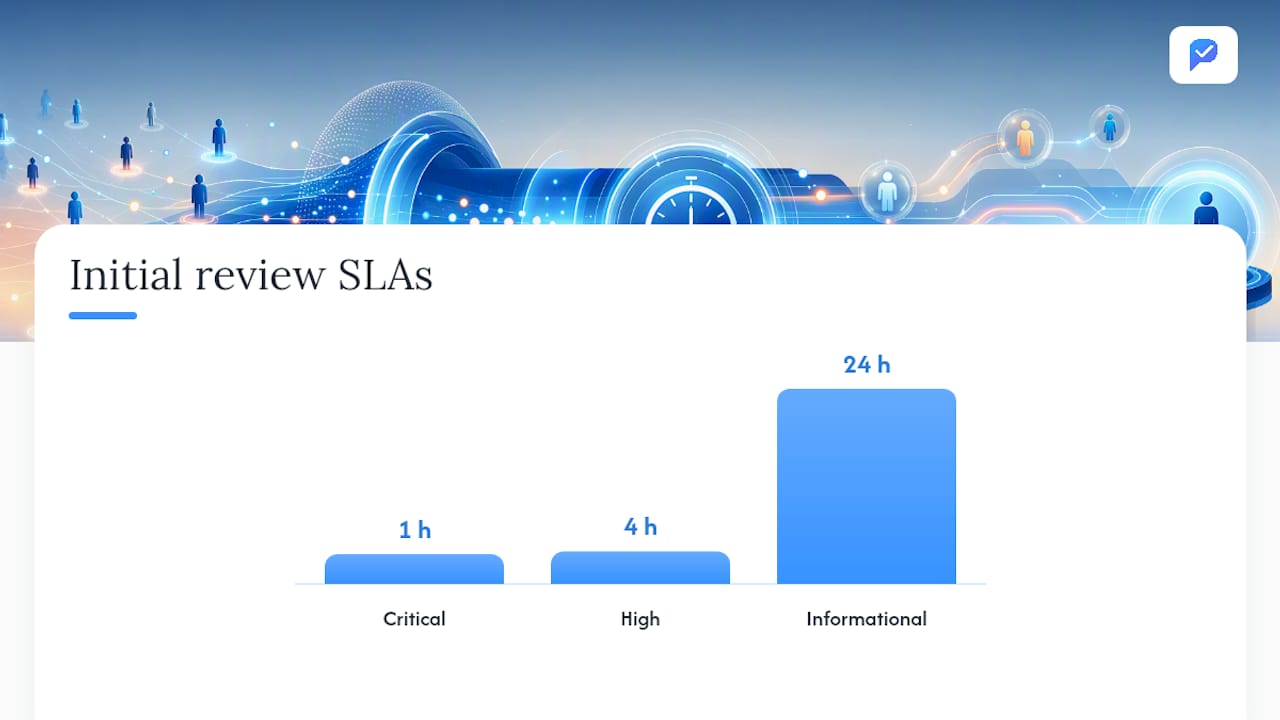
Operational SLAs by severity:
- Critical: acknowledge within 15 minutes, initial review within 1 hour, final decision within 24 hours
- High: acknowledge within 1 hour, review within 4 hours, decision within 48 hours
- Informational: review within 24 hours, no hard decision deadline
Track these metrics to measure whether your alert system is actually improving outcomes: reaction time (time from alert fire to first reviewer action), time-to-decision after alert, false-positive rate, candidate contact rate after alert, and impact on overall time-to-hire.
Reaction-time delta, measured before and after alert deployment, is the clearest ROI indicator you have. If your team was averaging four hours to act on a completed screen and is now averaging 20 minutes, that compression shows up directly in candidate experience scores and pipeline velocity.
What do effective alert messages actually look like?
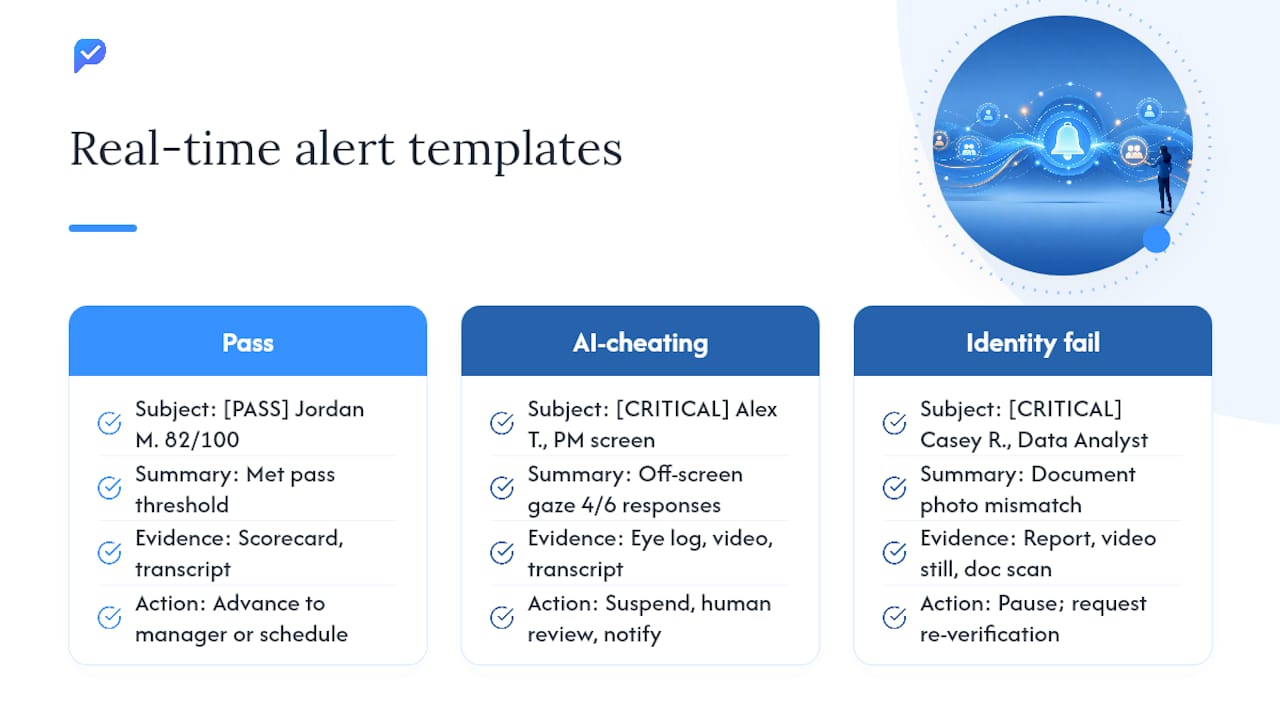
Three templates cover the most common scenarios your team will encounter.
Completed screen, pass threshold met Subject: [PASS] Jordan M. completed Software Engineer screen — score 82/100 Summary: Candidate met the pass threshold. Resume + live response scoring attached. Evidence: Scorecard link, transcript PDF Action: Advance to hiring manager review or schedule next round
AI-cheating flag from eye-tracking Subject: [CRITICAL] Alex T. — eye-tracking anomaly detected, Product Manager screen Summary: Sustained off-screen gaze pattern detected across 4 of 6 responses. Confidence: high. Evidence: Eye-tracking log, video recording, transcript Action: Suspend session, assign human reviewer, notify candidate that additional verification is required
Identity mismatch or failed verification Subject: [CRITICAL] Identity verification failed — Casey R., Data Analyst screen Summary: Document photo does not match live video. Verification score below threshold. Evidence: Verification report, video still, document scan reference Action: Pause candidacy, contact candidate for re-verification, log decision in ATS
Format guidance applies to all three: keep the subject line under 10 words with the severity tag first, write a one-line summary that answers "what happened," list the evidence in three lines or fewer, and end with a single direct action.
Step-by-step rollout checklist for enabling real-time alerts
A phased rollout reduces risk and gives your team time to calibrate. Piloting AI-driven interview workflows with clear milestones is the most reliable path to sustainable adoption.
- Identify priority roles (Week 1): select two to three high-volume or high-value roles for the pilot
- Define triggers and thresholds (Week 1): document which events fire alerts and at what sensitivity
- Map owners and escalation chains (Week 1): assign a named reviewer to every alert type
- Configure low-sensitivity rules (Week 2): start with static thresholds; avoid percentile rules until you have baseline data
- Run shadow alerts (Weeks 2–4): fire alerts without routing to reviewers; audit false-positive rate
- Tune thresholds (Week 5): adjust based on shadow-alert audit; target a false-positive rate below 10%
- Train reviewers (Week 5–6): walk through triage workflow, SLAs, and evidence review procedures
- Finalize retention and access policies (Week 6): confirm role-based access controls and export formats
- Go live on pilot roles (Week 7): activate routing; enforce SLAs; log all reviewer actions
- Measure and report (Weeks 7–8): track reaction-time delta, false-positive rate, and time-to-decision
- Phased expansion (Weeks 9–12): extend to additional roles; apply lessons from pilot calibration
| Phase | Weeks | Key milestone |
|---|---|---|
| Pilot | 1–4 | Shadow alerts running; ownership mapped |
| Validation | 5–6 | Thresholds tuned; reviewers trained |
| Rollout | 7–12 | Live alerts; SLAs enforced; metrics tracked |
How Evy implements these patterns in practice
Evy's AI interview platform puts real-time eye-tracking at the center of its alert architecture. When a candidate's attention patterns deviate from natural thinking behavior during a live screen, the system flags the event immediately, attaches the video clip, transcript segment, and eye-tracking log, and routes the alert to the assigned reviewer. No manual review of raw footage required to surface the signal.
Key features that map directly to the operational patterns in this guide:
- Real-time eye-tracking flags with confidence scoring
- Automated scoring combining resume analysis and live response evaluation
- Video and transcript evidence bundle attached to every alert
- ATS integrations for direct pipeline updates without context switching
- Role-based access controls limiting evidence access to authorized reviewers
- Audit logs capturing every system and reviewer action for compliance and appeals
Evy's approach is built on the principle that speed and fairness are not in conflict. Real-time alerts surface integrity issues immediately, while the full evidence bundle ensures every decision is reviewable, defensible, and fair to the candidate.
HR teams evaluating Evy can start with a pilot on two to three roles, use the implementation checklist above as a framework, and review how AI identifies qualified candidates to understand how scoring and alert evidence connect.
When should you trust the alert, and when should a human decide?
Real-time alerts are triage tools. They surface what needs attention; they do not replace the judgment call.
A critical eye-tracking flag or identity mismatch should always route to a human reviewer before any adverse action is taken. The alert tells you something is worth examining. The reviewer decides what it means in context. Automating the flag is appropriate; automating the consequence is not, particularly under U.S. employment law frameworks that require consistent, documented decision-making.
Escalate to human review whenever the evidence is ambiguous, the candidate has a documented accommodation, or the alert type has a known false-positive pattern in your cohort. Document the escalation reason, the reviewer's finding, and the communication sent to the candidate. That documentation is your compliance record if a decision is ever challenged.
Alerts also create a candidate-experience obligation. If a screen is suspended due to a flag, the candidate deserves a clear, timely explanation. Building that communication into your alert playbook, not as an afterthought, is what separates a fair process from a frustrating one.
Evy brings these alert patterns together in one platform
Screening at scale without real-time visibility means your team is always reacting late. Evy gives HR leaders the eye-tracking alerts, automated scoring, and audit-ready evidence bundles described throughout this guide, without requiring a separate monitoring tool or manual video review workflow.
The platform connects directly to your existing ATS, routes alerts by severity and role, and logs every reviewer action for compliance. For teams running high-volume screens or filling roles where integrity matters, that combination of speed and auditability is difficult to replicate with generic tools. Explore how Evy screens at scale and request a pilot to see the alert architecture in action with your own candidate data.
Sources
- Greenhouse Job Board real-time alerts with Swiftask
- Real-Time Workflow Monitoring for Recruitment Teams - Skillfuel
- Monitoring Recruiting & Talent Acquisition Teams | eMonitor
- Real-Time Analytics for Recruitment Success
- Optimize Hiring Outcomes with Real-Time Recruitment Analytics